TextareaField (텍스트영역필드)
TextareaField 정리해 드릴게요.
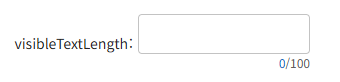
Va.TextareaField — 라벨 + 여러 줄 텍스트 입력
Va.Textarea가 순수 여러 줄 입력이라면, Va.TextareaField는 그 위에 폼 라벨·필수 표시·검증 메시지를 얹은 완성 폼 필드입니다. Field 계열 아키텍처 그대로, 내부에 Va.Textarea를 소유하는 Composition 구조. 게시글·리뷰·메모 폼에 정석.
- 클래스: Va.TextareaField — va_component.js:9418
- short name: textareaField
- 상속: Va.Field (다른 Field 형제들과 같음)
- 내부 컴포넌트: Va.Textarea 인스턴스 (fieldComponent)
- isContainer: true
- 베이스 CSS: va-field
1. 기본 사용
{
    tagName: 'textareaField',
    label: '리뷰',
    value: '',
    placeholder: '리뷰를 작성하세요',
    maxLength: 500,
    visibleTextLength: true,
    required: true,
    onChange: 'onReviewChange'
}
라벨 + 검증 + 여러 줄 입력 + 글자 수 카운터가 한 번에 세팅.
2. Textarea / InputField와의 차이
항목Va.TextareaVa.TextareaFieldVa.InputField
| 폼 라벨 | ✕ | ✓ | ✓ |
| 검증 메시지 | ✕ | ✓ | ✓ |
| 필수 표시(별표) | ✕ | ✓ | ✓ |
| 입력 형태 | 여러 줄 | 여러 줄 | 한 줄 |
| 글자 수 카운터 | ✓ | ✓ (내부 위임) | ✕ |
| 높이 자동 조절 | ✓ | ✓ (내부 위임) | ✕ |
| 리사이즈 방향 | ✓ | ✓ | ✕ |
| height-stretch 클래스 자동 | ✕ | ✓ | ✕ |
한 줄 요약: "폼 안 라벨 붙은 여러 줄 텍스트 필드 — 게시글·리뷰·메모에 최적."
3. 주요 속성
Textarea 전용 (계승)
속성기본값설명
| maxLength | — | 최대 글자 수 |
| byteMaxLength | — | 바이트 단위로 계산 (한글 3바이트 등) |
| visibleTextLength | — | 우하단 글자 수 카운터 표시 |
| autoHeight | — | 내용에 따라 높이 자동 조절 |
| resizeField | — | 'none' / 'vertical' / 'horizontal' / 'both' |
⚠️ byteMaxLength → byteMaxlength 오타 — 소스 va_component.js:9446에서 optionField로 넘길 때 byteMaxlength(소문자 l)로 잘못 표기됨. 다만 va_component.js:9470에서 update()가 직접 this.fieldComponent.byteMaxlength = this.byteMaxLength로 재세팅하므로 실제 동작은 문제없음. 소스 검색 시 두 표기 모두 확인 필요.
라벨 관련 (Field 상속)
속성설명
| label | 폼 라벨 |
| labelPosition | top / bottom / left / right |
| labelWidth | 라벨 폭 |
| noLabel | 폼 라벨 숨김 |
| infoButton | info 아이콘 |
| required | 필수 표시 |
필드 관련 (Textarea로 위임)
속성설명
| value | 텍스트 값 |
| placeholder | 플레이스홀더 |
| readonly / disabled | 상태 |
| size / appearance / shape | 시각 스타일 |
| textAlign | 정렬 |
| stopPropagation | 이벤트 버블링 |
| masking / valueType | Field 표준 전달 (Textarea에서 실효 제한) |
검증
속성설명
| validation | {state, size, message} |
| validationState | success / warning / error |
| validationMessage | 메시지 |
세부 커스터마이즈 (textarea 옵션 키)
{
    tagName: 'textareaField',
    label: '메모',
    textarea: {                       // ← 내부 Textarea에 직접 전달
        // Textarea 세부 옵션
    }
}
각 Field 계열 옵션 키:
- InputField → input
- TextareaField → textarea
- ComboboxField → combobox
4. height-stretch 자동 부여
TextareaField의 update()가 fieldDivElement에 height-stretch 클래스를 자동 부여합니다 (va_component.js:9469).
의미: 부모 컨테이너의 높이를 채우도록 CSS 조정. 폼 안에서 Textarea가 남는 세로 공간을 자연스럽게 차지하게 됩니다.
이건 InputField 등 한 줄 필드에는 없는 특유 로직으로, 여러 줄 필드는 높이가 유동적이라는 걸 CSS 레벨에서 반영한 것.
5. 이벤트
Field 표준 이벤트 세트. setFieldComponentEvent() 호출로 focus/blur/change/keydown 등이 표준 방식으로 dispatch됨:
이벤트시그니처발생 시점
| change | (component, element, evt) | 값 변경 확정 시 (blur 후). 검증 자동 리셋 |
| focus / blur | (component, element, evt) | 포커스 진입/이탈 (blur는 200ms debounce) |
| keydown | (component, element, keyCode, evt) | 키다운. 검증 자동 리셋 |
| keyup | (component, element, evt) | 키업 (실시간 감지에 유용) |
| click | (component, element, evt) | 필드 클릭 |
| mousedown / contextmenu | 표준 |
change 콜백 예시
onReviewChange(comp, el, evt) {
    const value = comp.getValue();
    console.log('작성된 리뷰:', value);
}
6. 메서드
값 관리 (Field 상속)
메서드설명
| getValue() | 내부 Textarea의 getValue() 위임 |
| setValue(value) | 값 세팅. autoHeight면 자동 재계산 트리거 |
상태 (Field 상속)
메서드설명
| setDisabled(bool) / getDisabled() | 비활성화 |
| setReadOnly(bool) / setReadonly(bool) | 읽기 전용 |
| setLabel(label) | 폼 라벨 변경 |
| setPlaceholder(text) | 플레이스홀더 변경 |
| setSize(size) | 크기 |
검증
메서드설명
| setValidation(state, message) | 검증 표시 |
| clearValidation() | 검증 해제 |
포커스
메서드설명
| focus() / blur() | 내부 Textarea에 위임 |
유틸
메서드설명
| calcHeight() | 높이 재계산 (오토높이 상황). fieldDivElement에 padding: 2px도 함께 조정 |
7. 내부 구조
<div elname="element" class="va-field [vertical|horizontal]" field="true">
  <div elname="inner" class="field-inner">
    <div elname="labelDiv" class="label-div">
      <label cpname="label">리뷰 <span class="required">*</span></label>
    </div>
    <div elname="comment" class="field-comment"></div>
    <div elname="fieldDiv" class="field-div height-stretch">     ← 자동 부여
      <div cpname="field" class="va-textarea">                   ← 내부 Va.Textarea
        <div class="field-wrapper">
          <textarea style="border:0px"></textarea>
          <div class="focus-line"></div>
        </div>
        <div class="text-length-inner"                            ← visibleTextLength일 때
             style="display:flex">
          <span class="text-length">123</span>
          <span>/</span>
          <span class="text-max-length">500</span>
        </div>
      </div>
    </div>
  </div>
  <div elname="validationDiv" style="display:none">
    <div class="va-validation">...</div>
  </div>
</div>
8. mounted()가 내부 Textarea에 위임
mounted(){
    this.fieldComponent.mounted();
}
Field 계열 중 특이하게 mounted()를 명시적으로 오버라이드해 내부 Textarea의 mounted()를 호출합니다. 이유는 Textarea가 autoHeight 초기 계산을 mounted()에서 300ms 지연으로 하기 때문 — Field가 이를 촉진.
9. 언제 쓰나
TextareaField가 맞을 때
- 폼 안 게시글·리뷰·메모 본문
- 긴 설명·비고·문의 입력
- 주소 상세 (여러 줄)
- 글자 수 제한이 있는 텍스트 필드
- 자동 높이 조절이 자연스러운 상황
다른 걸 쓸 때
- 라벨 없이 인라인 → Va.Textarea
- 한 줄 입력 → Va.InputField
- 코드 편집 → 별도 Monaco 등
- 리치 텍스트 → 별도 에디터
10. 흔한 조합 예시
// 표준
{
    tagName: 'textareaField',
    label: '내용',
    placeholder: '내용을 입력하세요',
    style: { width: '100%', height: '200px' }
}

// 글자 수 제한 + 카운터
{
    tagName: 'textareaField',
    label: '리뷰',
    maxLength: 500,
    visibleTextLength: true,
    placeholder: '500자 이내로 작성',
    required: true
}

// 자동 높이
{
    tagName: 'textareaField',
    label: '메모',
    autoHeight: true,
    resizeField: 'none'
}

// 바이트 제한 (한글 폼)
{
    tagName: 'textareaField',
    label: '한글 게시글',
    maxLength: 900,
    byteMaxLength: true,
    visibleTextLength: true
}

// 좌측 라벨
{
    tagName: 'textareaField',
    label: '비고',
    labelPosition: 'left',
    labelWidth: 100,
    style: { width: '100%', height: '150px' }
}

// info 툴팁
{
    tagName: 'textareaField',
    label: '추가 요청사항',
    infoButton: {
        tooltip: '배송 시 주의사항이 있으면 적어주세요'
    },
    placeholder: '예: 부재 시 경비실'
}

// 읽기 전용 (긴 텍스트 표시)
{
    tagName: 'textareaField',
    label: '이용약관',
    value: '전문 내용...',
    readonly: true,
    style: { width: '100%', height: '300px' }
}
11. 실전 예 — 문의 폼
class Inquiry extends Va.View {
    onSubmit(btn, el, evt) {
        const title    = this.getRef('title').getValue();
        const category = this.getRef('category').getValue();
        const content  = this.getRef('content').getValue();

        if (!title) {
            this.getRef('title').setValidation('error', '제목을 입력하세요');
            return;
        }
        if (!content || content.length < 20) {
            this.getRef('content').setValidation('error', '20자 이상 입력하세요');
            return;
        }

        InquiryService.save(this, { title, category, content }, (view, ok) => {
            if (ok) new Va.Alert({ title: '완료', message: '문의가 접수되었습니다' }).show(view);
        });
    }

    config() {
        return {
            tagName: 'page',
            tags: [{
                tagName: 'panel',
                tags: [
                    { tagName: 'h2', innerHTML: '문의하기' },
                    {
                        tagName: 'inputField',
                        ref: 'title',
                        label: '제목',
                        required: true,
                        maxLength: 100
                    },
                    {
                        tagName: 'comboboxField',
                        ref: 'category',
                        label: '분류',
                        data: [
                            { key: 'GENERAL', display: '일반' },
                            { key: 'BILLING', display: '결제' },
                            { key: 'TECHNICAL', display: '기술' }
                        ]
                    },
                    {
                        tagName: 'textareaField',
                        ref: 'content',
                        label: '내용',
                        required: true,
                        maxLength: 2000,
                        visibleTextLength: true,
                        placeholder: '문의 내용을 자세히 작성해주세요 (20자 이상)',
                        style: { width: '100%', height: '250px' }
                    },
                    {
                        tagName: 'button',
                        text: '접수',
                        appearance: 'primary',
                        onClick: 'onSubmit'
                    }
                ]
            }]
        };
    }
}
12. 알아두면 좋을 주의사항
- byteMaxLength 오타 잔재 — 옵션 전달 시 byteMaxlength(소문자 l)로 되어 있지만 update()가 재세팅하므로 실제 동작은 문제없음. 소스 검색 시 두 표기 확인.
- height-stretch 클래스 자동 — fieldDiv가 남은 높이를 채움. 부모 컨테이너 flex 설정에 따라 유연하게 늘어남.
- mounted() 위임 — 내부 Textarea의 mounted() 호출. autoHeight 초기 계산이 정확히 되게 함.
- 옵션 키 textarea — 세부 커스터마이즈용.
- change/keydown 시 검증 자동 리셋 — 사용자 편집 시 이전 에러 사라짐.
- Enter는 줄바꿈 — 폼 제출 트리거 아님.
- maxLength 강제 — HTML 표준 방식. 붙여넣기도 자동 제한.
- byteMaxLength: true는 JS 계산 — HTML 표준 아님.
- autoHeight와 resizeField 상충 — 자동 조절 시 'none' 권장.
- autoHeight 초기 300ms 지연 — 렌더링 튐 가능.
- getValue()는 문자열 — 그대로 사용.
- focus()는 내부 textarea에 포커스 — 표준.
- change는 blur 후 발생 — 실시간엔 keyup.
- required: true는 별표만 — 실제 검증은 개발자가.
13. textareaField vs inputField 선택
상황추천
| 한 줄 텍스트 | inputField |
| 여러 줄 일반 텍스트 | textareaField |
| 긴 글 + 글자 수 제한 | textareaField + visibleTextLength |
| 자연스러운 높이 조절 | textareaField + autoHeight |
| 코드 편집 | monaco (별도) |
| 인라인 (라벨 없이) | Va.Textarea |
참고
- API 문서 페이지: https://vanillafront.com/docs.html?theme=light#main#apitextareafield
- 연관: Va.Textarea(내부), Va.InputField(형제, 한 줄)